
Widgets for Adobe Acrobat : InDesign Fixups
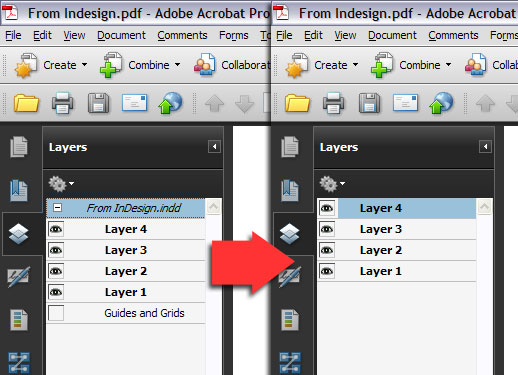
When you export a PDF from Adobe InDesign and choose the "Create Acrobat Layers" option, the resulting PDF file contains all the layers from your INDD document, placed in a "nest" structure with the document filename as the heading. Along with the layers you have created in your document, InDesign always adds the "Guides and Grids" layer, even though there is usually nothing in it. The result in Acrobat's layers navigation pane is shown in the left hand screenshot.
What you were probably expecting is a simple list of layers, as in the right hand screenshot - but there's no way inside InDesign to change the nesting of layers. It's also not (yet) possible to remove this layer structure with the user interface tools in Adobe Acrobat - so we've written a small Acrobat JavaScript that performs two functions:
- It promotes all layers inside the nest to the top-level, and deletes the nest.
- It unlists the 'Guides and Grids' layer from the sidebar panel - the layer is NOT deleted, but it's no longer mentioned.

The script is made available via Creative Commons Share-alike, so you can use it and modify it for personal and commercial purposes provided you do not resell the script itself as a commercial product. It works with Acrobat 8 and higher on Windows and OS X.
Notes:
- The menu item "Unlist Guides and Grids" preserves the nest structure, and simply removes the mention of the layer.
- The menu item "Promote Layers" removes the nest structure, and has an option to also remove the Guides and Grids layer.
- Only the first level of nesting is removed, so to clear multiple-level nests, run the script again.
- Any top-level layers are preserved.
- The action processes all pages of the document.
- The script does not change layer properties, locks, visibility or associated layer actions.
- As the script rewrites the OCG structure, it cannot be undone and so you should always save a backup copy.
- The 'Guides and Grids' layer is empty unless you have checked "Visible guides and baseline grids" in the "Include" area of the InDesign PDF export dialog. In either case, our script does not delete the layer itself of any content that may be on it; but removes it from the visible tree displayed in Acrobat and Reader. This means the PDF can still be re-imported into another application.
- If you want to retain the nest structure but change the name of the nest, double-click it in the Acrobat layers sidebar.
- If you want to completely remove the Guides and Grids layer, use the Merge layers command (available by clicking the gears icon in the layers sidebar) to combine it with another layer - as it has no content, merging it won't alter the appearance of the document.
- The script is provided as-is; if you have any problems with it use the link below to contact us, but we do not provide any warranty.
Installation:
To install the script, open the ZIP file from the link above and extract the .js file into your Acrobat JavaScript folder, which on
Windows is usually found at:
/Program Files/Adobe/Acrobat ?.0/Acrobat/JavaScripts
or on a 64-bit machine, at:
/Program Files(x86)/Adobe/Acrobat ?.0/Acrobat/JavaScripts
On Mac systems, locate "Adobe Acrobat Pro.app" in your Applications folder, show the package contents, and extract the .js file into:
Contents>MacOS>JavaScripts
To check the correct folder location (for all operating systems and customized installs), open Acrobat and press CMD-J
or Ctrl-J to open the interactive console, clear the contents, type
app.getPath("app","javascript")
select that text and press CMD-Enter or Ctrl-Enter. The path to use will be shown in the console.
Once installed, restart Acrobat and you will have an Edit > Flatten menu whenever there's an open document. You can of course modify the script for your own purposes, and we've commented it to show which part does what. Restart Acrobat if you change the script, as they're only loaded when the application initializes. If the menu doesn't appear after you've changed the code, check the JS console for errors. It'll tell you the line number with the mistake on.
IMPORTANT
If you're using Acrobat XI and get a crash message "An internal error occurred" when clicking the menu item, then make sure you have the correct JavaScript permissions. Open Acrobat's preferences (CMD/Ctrl-K), and in the JavaScript category ensure that "Enable menu items JavaScript execution privileges" is ticked.